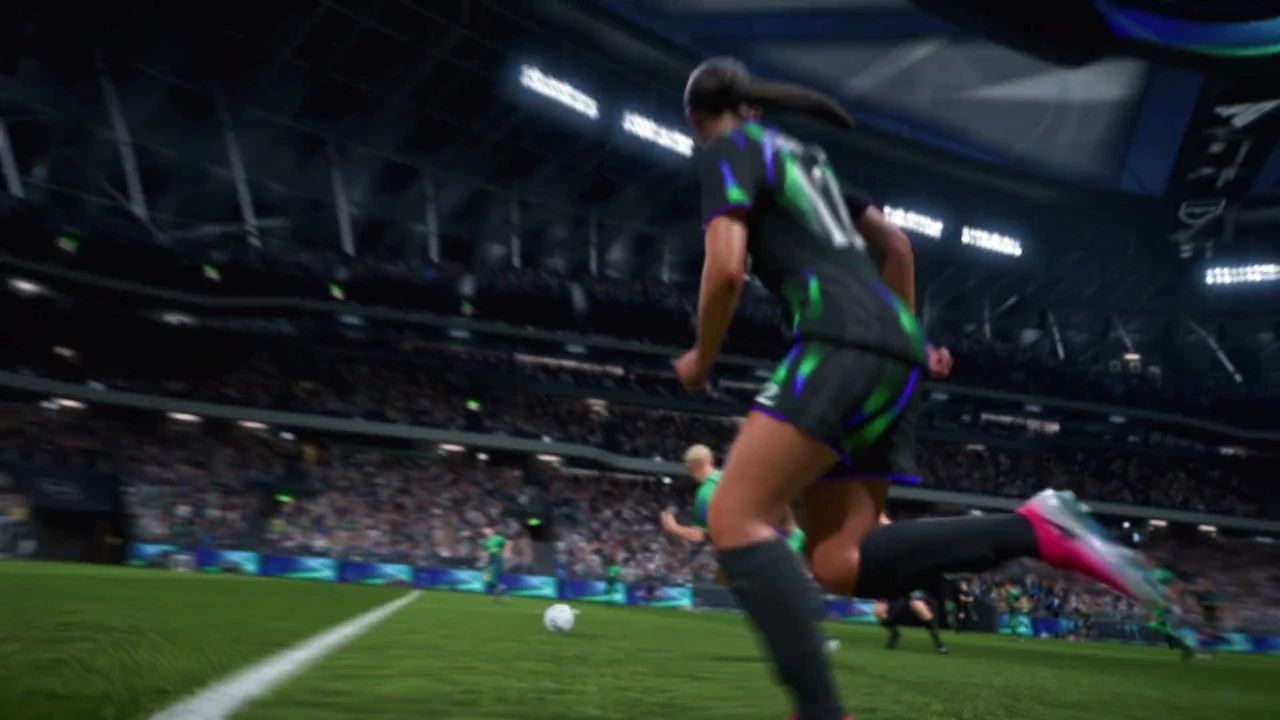
EA SPORTS FC 27 shifts control away from automated teammate assistance toward manual defending, directional passing, manual corner-box positioning, and rebalanced PlayStyles alongside Authentic Gameplay 2.0 for offline modes. This reference gathers the game’s core mechanics, button inputs, Player Roles and formations, database totals, controller and PC settings, and post-launch balance updates through Title Update v1.3.0.
Contents
- Competitive vs Authentic Gameplay 2.0
- Manual defending, corner kicks, and set pieces
- Attacking runs, passing, shooting, skill moves, and celebrations
- PlayStyles, PlayStyles+, and FC 27 rebalances
- Player Roles, formations, and custom tactics codes
- Controller, camera, keyboard, and accessibility settings
- Title Update gameplay balance timeline
- Gameplay systems and tuning summary
Competitive vs Authentic Gameplay 2.0
EA SPORTS FC 27 separates its match tuning into Competitive, Authentic, and Custom gameplay type presets. The Competitive preset applies the mandatory settings used across online multiplayer modes and can also be switched on for offline play, whereas Authentic keeps default offline assistance levels and Custom exposes user and CPU sliders for speed, shooting, passing, injuries, goalkeeping, team positioning, ball control, and defending.
In offline modes such as Career Mode, Authentic Gameplay 2.0 adds heavier, grounded movement on touches, turns, and sprints while widening the range of tactical styles used by CPU teams. Wet or snowy pitch conditions can cause sharp turns to slip, visible fatigue and emotional body language react more strongly to match states, and heavier physical duels lead CPU players to commit more fouls and create additional set pieces.
To fine-tune offline matches, Authentic Gameplay 2.0 adds 25 Gameplay Sliders alongside 10 CPU Sliders split between CPU Opponent and CPU Teammate settings. Splitting opponent and teammate controls lets players in single-player lock modes such as Player Career tune how their AI teammates behave independently from the opposition.
From Closed Beta feedback, EA calibrated Authentic Gameplay difficulty spacing across Professional, World Class, and Legendary tiers, recalibrated CPU slider thresholds such as Sliding Tackle Frequency, and adjusted how CPU teams build attacks, approach 1v1 finishes, and defend through passes and triggered runs. Title Update v1.2.0 later tuned the Team Positioning Marking Slider so values above 50 produce a more relaxed press, reduced heavy touches in wet weather, and fixed the Defending Aggression CPU slider across Kick-Off, Tournaments, and Career Mode.
Manual Defending, Corner Kicks, and Set Pieces
AI Defending and Manual Defending
In Competitive gameplay, AI-controlled defenders no longer launch automatic tackles when a ball carrier dribbles near them. Instead, AI teammates hold their shape and only win the ball when a loose ball falls within reach or a dribbler runs straight into them, while AI interception reach is shorter than the reach of a defender you control manually.
To balance the cut to defensive automation, manually controlled defenders gain faster jockey speed and longer manually triggered standing tackle range than in FC 26. Teammate Contain also marks from a slightly wider distance than before, requiring you to switch onto the pressing player yourself to close down the dribbler directly.
Team Press, Defensive Depth, and Shoulder Challenges
Team Press has no effect while the ball sits inside your defensive third, stopping AI teammates from automatically swarming attackers near your own goal. Higher up the pitch, defenders still step toward marked opponents under Team Press, though they press less effectively than midfielders and forwards and leave space behind the back line if bypassed.
Lower Defensive Depth settings now pull back lines deeper earlier to protect space in behind, while still shifting dynamically with play. On physical challenges, Shoulder Challenge performs best side-by-side rather than from behind; pressing the Shoulder Challenge input repeatedly while chasing makes the defender extend an arm and lose sprint speed, and  Bruiser+ received a slight pre-launch reduction.
Corner Kicks, Crossing, and Free Kicks
Direct corner kicks shift the camera toward the penalty area after you pick a target zone, giving you a brief window to switch players, start runs, use Shielding, or hold R1 (PlayStation) / RB (Xbox) to trigger Avoidance and slip around markers in crowded space. Short corners bypass this box view and immediately return to your standard gameplay camera.
Inside the box, EA SPORTS FC 27 removes automated pull toward the landing spot, leaving you to read flight trajectory, factor in player height, jumping, and momentum, and attack the ball yourself. Open-play crosses likewise target open space based on your aim and power instead of locking onto a teammate, making clean headers harder to connect yet sharper when timed well.
For direct free kicks, prioritize takers with strong Free Kick Accuracy, Curve, Shot Power, and the  Dead Ball PlayStyle, which boosts set-piece speed, curve, and trajectory preview length. Select your aim point, adjust where you strike the ball to shape spin and height, set power, or use quick free kicks when available to restart play before opponents reset; both Training Center and Practice Arena let you drill free-kick techniques outside matches.
Attacking Runs, Passing, Shooting, Skill Moves, and Celebrations
Attacking Spatial Awareness and Triggered Runs
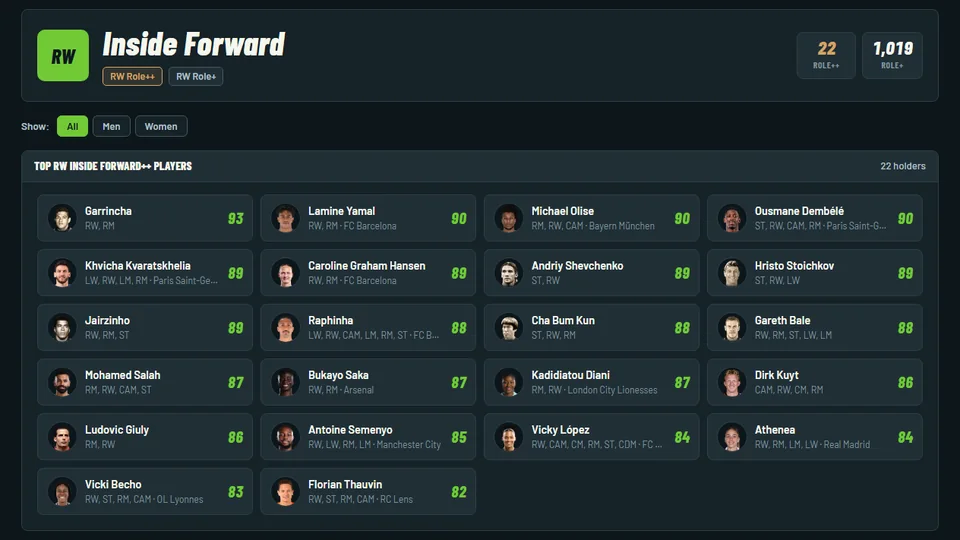
Updated Attacking Spatial Awareness helps AI teammates read open lanes, defensive shape, and the offside line—for instance, wingers can hold a run parallel to the back line and bend into the box once the pass leaves your foot. This system pairs directly with Player Roles: roles define which runs a player considers (such as an Inside Forward attacking the channel between center back and fullback versus a Winger holding width), while Role+ and Role++ familiarity increases the urgency of those movements.
Two manual run modifiers complement straight runs and Pass & Go:
- Triggered Curved Runs: tap L1 + R1 (PlayStation) or LB + RB (Xbox) to send a teammate curving around defenders into open space.
- Pass & Follow Runs: press L1 + R1 + X (PlayStation) or LB + RB + A (Xbox) so the passer immediately follows their pass with an overlapping or inside curved run.
Curved runs take longer to develop because of their wider arc, and manually triggered runs no longer continue across the whole pitch. In EA SPORTS FC 27, triggered runners stop after a limited distance and resume positional shape unless you issue the run command again while staying within range.
Passing and Shooting Updates
Standard passing options span Ground Pass, Through Pass, Lob Pass (or cross from wide zones), Lobbed Through Pass, and Driven Ground Pass, with exact button bindings listed under Learn to Play > Practice Arena > Pause > Button Help or in-match under Settings > Basic Controls. Both ground and lobbed Through Passes now track your exact directional stick aim rather than steering automatically into open space.
Dinked Passes are now fully manual and can only be triggered by double-tapping Through Pass while aiming manually. When you double-tap Ground Pass, the game performs a standard Ground Pass so repeated taps do not accidentally loft the ball.
Shooting choices include regular shots, a curled  Finesse Shot, a lofted
 Chip Shot, a long wind-up
 Power Shot, an outside-of-the-foot Trivela Shot (requiring the
 Gamechanger or Gamechanger+ PlayStyle), and a
 Low Driven Shot. Press the shot button a second time after setting power to apply Low Driven to regular shots, a Finesse Shot, a Power Shot, a Trivela Shot, volleys, or headers—only a Chip Shot cannot combine with the Low Driven modifier.
Off-Balance Dribbling and AcceleRATE
Driven by Balance, Agility, and Dribbling attributes, Off-Balance Dribbling lets qualifying dribblers keep moving through a stumbling touch after bumps, collisions, or shoulder challenges instead of immediately losing control. Support for Off-Balance Dribbling is exclusive to PC, PlayStation 5, Nintendo Switch 2, and Xbox Series X|S.
AcceleRATE sprint profiles (Explosive, Controlled, and Lengthy) sit closer together in EA SPORTS FC 27, giving base Acceleration and Sprint Speed attributes greater weight while limited triggered-run distances curb extended Lengthy sprints. Female players must now measure at least 172 cm tall to qualify for the Lengthy profile.
Skill Moves and Celebrations
You can view platform-specific Skill Move inputs under Learn to Play > Practice Arena > Pause > Skill Moves Help, and players who prefer simpler right-stick execution can enable Simplified Skill Moves (Off by default) in gameplay settings to trigger contextual moves using Up, Down, Left, or Right. For every star tier and stick pattern, consult the Skill Moves list and controls guide.
After scoring, you can trigger a Signature Celebration, run a random celebration, or cancel the sequence early to speed up the restart, with platform-specific bindings listed under Pause > Settings > Celebrations. Note that some celebrations require unlocking or differ from earlier titles; see the celebrations list and inputs guide for full combinations.
PlayStyles, PlayStyles+, and FC 27 Rebalances
PlayStyles layer distinct trait effects over a player’s attributes in two tiers: a regular PlayStyle (Silver badge) grants the base enhancement, while a PlayStyle+ (Gold badge) delivers a stronger version and displays an overhead icon when activated on the pitch. Across modes, players hold PlayStyles by default or gain them via Evolutions in Ultimate Team, attribute prerequisites and leveling in The Grounds and Player Career, or Training and the Youth Academy in Manager Mode.
The database contains 36 PlayStyles spanning Finishing, Passing, Ball Control, Defending, Physical, and Goalkeeper categories. Browse every trait in the PlayStyles database, inspect holders in players, or compare items side by side in the comparison tool.
For EA SPORTS FC 27, EA rebalanced individual PlayStyles to narrow the gap between base attributes, regular PlayStyles, and PlayStyles+:
- Finesse Shot: spin, animation speed, and off-angle performance scale more evenly from base attributes, narrowing the divide between base ratings, Finesse Shot, and Finesse Shot+.
 Technical (also referenced as Technical Dribbler in the Gameplay Deep Dive): tightened the gap between PlayStyle and PlayStyle+, keeping Technical+ smoother while making tiers closer.
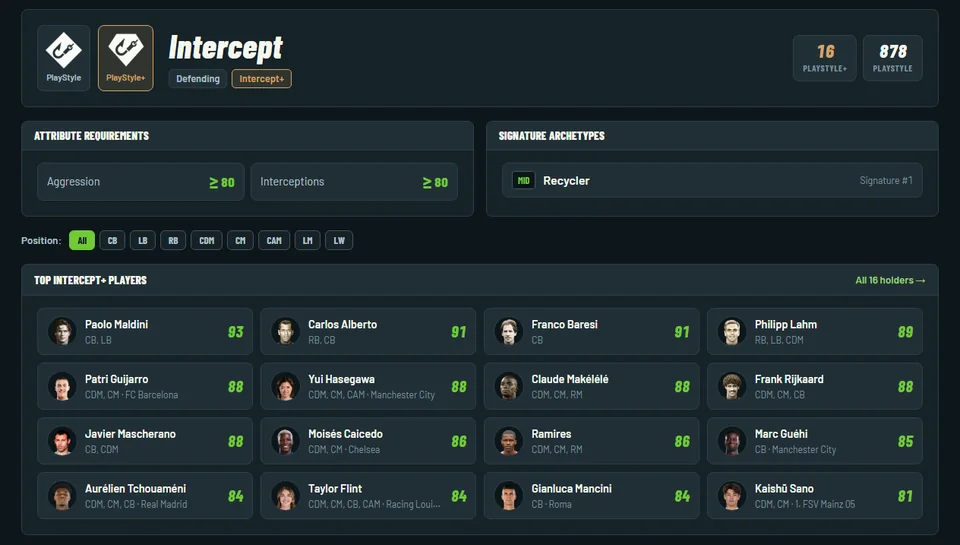
 Intercept: expanded reach and ball-retention odds for non-PlayStyle players who carry a high Interceptions attribute.
 Rapid: slightly trimmed the dribbling animation speed bonus for Rapid and Rapid+ while leaving non-PlayStyle speed untouched.
 Quick Step: reduced the dribbling and acceleration burst on Quick Step and Quick Step+, placing more importance on the Acceleration attribute.
 Pinged Pass: removed the slight reduction to receiver trap error so the trait focuses on pass delivery rather than boosting another player’s first touch.
 Tiki Taka: removed both the animation playback speed boost and receiver trap-error reduction, keeping its focus on quick short combinations.
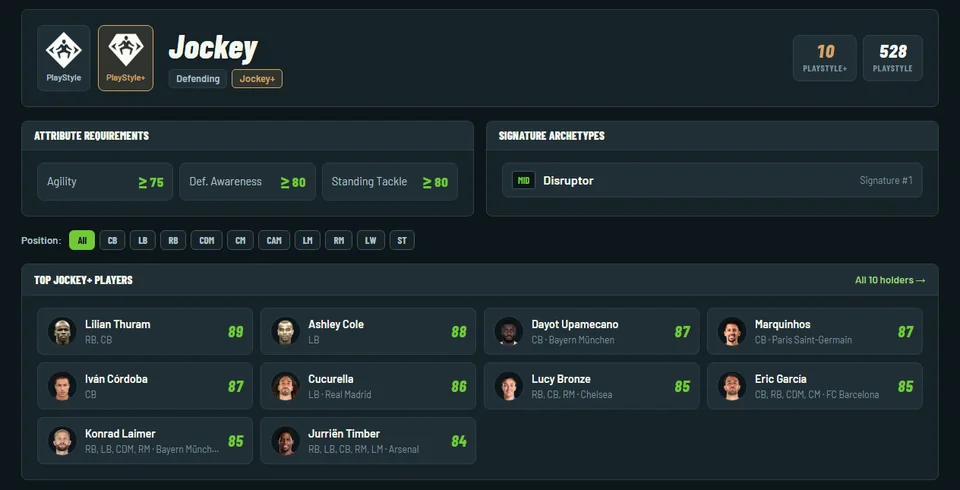
 Jockey: raised jockey sprint acceleration for non-PlayStyle defenders while lowering the exit-jockey sprint acceleration boost on Jockey and Jockey+.
 Precision Header: rebalanced the heading boost to shrink the gap between Precision Header and Precision Header+.
- Low Driven Shot: removed the shot-velocity boost so shot speed scales purely from core shooting attributes and input power, while keeping the targeting boost on Low Driven Shot and Low Driven Shot+.
Ahead of launch, EA also slightly trimmed the extra physical bonus granted by Bruiser+ alongside its Shoulder Challenge rework.
Player Roles, Formations, and Custom Tactics Codes
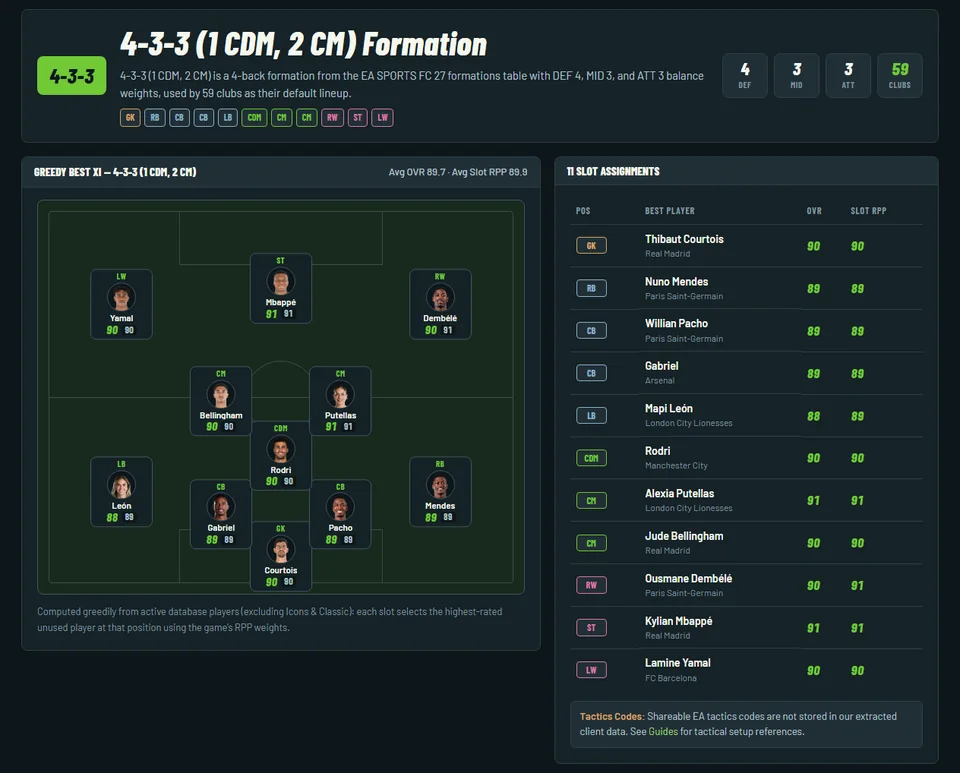
EA introduced FC IQ in EA SPORTS FC 25 (August 2024), where your Formation governs how the team lines up out of possession and which positions are active, Player Roles control off-ball movement with and without the ball, and each role’s Focus modifies one or two tactical traits; in EA SPORTS FC 27, the September 2026 Closed Beta update from EA notes that Player Roles continue to determine available runs alongside Attacking Spatial Awareness. The database tracks 49 Player Roles—including position-specific entries such as Advanced Forward, Box-to-Box, Ball-Playing Keeper, Inverted Wingback, Wide Back, and Box Crasher—across 29 formations (such as 4-2-1-3) and 21,523 players.
In EA SPORTS FC 25, EA defined Role Familiarity across four tiers—a base Role (competent), Role+ (accomplished), Role++ (world-class), and Out of Position (marked by a yellow exclamation icon with simplified logic)—and in EA SPORTS FC 27, Role Familiarity (Role+ and Role++) increases the urgency of a player’s runs. In that EA SPORTS FC 25 deep dive, Familiarity accounted for 10% to 40% of positioning calculations alongside Positioning or Defensive Awareness, accelerating transitions between attack and defense and expanding run choices.
In EA SPORTS FC 25 (August 2024), saving a custom setup created a shareable 11-digit Code storing all 11 Roles and Focuses alongside your Formation, Build-Up Style, and Defensive Awareness without including the tactic name. Under that EA SPORTS FC 25 specification, Codes worked across modes, consoles, and hardware generations, storing up to five tactics loaded via Use Code / Import Tactic, covered step by step in how to import tactics codes. You can also browse every position slot in the Player Roles index, build shapes in the tactics tool, and test lineups in the squad builder.
After launch, Title Update v1.1.0 overhauled the Team Management UI layout and fixed a bug that capped the Team Management screen at displaying only up to 5 Player Roles, while Title Update v1.2.0 fixed Tactics and Edit Lineup saving issues and released a Live Tuning Update for 95 Depth so extreme defensive lines drop off sooner while staying higher than other tactics.
Controller, Camera, Keyboard, and Accessibility Settings
Controller Layouts, Defending, and Player Lock
In Customize Controls, controller players can select Classic (default), Alternate, Two Button, or One Button layouts, though simplified One Button and Two Button layouts are restricted from Competitive Online matches. Using Classic or Alternate, you can swap face buttons with one another, swap shoulder buttons with triggers, or exchange left-stick movement with D-pad tactics inputs; you can also toggle Analog Sprint, while Trigger Effect and User Vibration Feedback are available on PC and PlayStation 5 only.
Key gameplay toggles shape manual control on the pitch:
- Defending: choose Advanced Defending (default, distinct button inputs per tackle type) or Tactical Defending (contextual tackle selection); Legacy Defending is unavailable when using the Competitive preset.
- Switching: Auto Switching defaults to On Air Balls and Loose Balls, Right Stick Switching offers Classic, Player Rotation, and Adaptive modes with Player Relative (default) or Ball Relative reference and sensitivity from 0 to 10 (default 4), and Next Player Switching selects between Classic, Goal Side, and Closest to Ball.
- Player Lock: Off by default; pressing both analog sticks locks control to the selected player. In EA SPORTS FC 27, locking away from the ball carrier carries extra risk because the CPU ball carrier now keeps moving on its current line without automatically dodging defenders and suffers slightly higher pass error.
Camera and Visual Accessibility Settings
The Offline and Online 11v11 modes default to the Competitive angle and let you switch across Tele Broadcast, Co-Op, Tactical, EA Sports GameCam, Tele, Classic, Dynamic, Broadcast, End to End, Pro, and Legacy presets, with Custom Camera Settings adjusting Height and Zoom from 0 to 20 (default 10). In The Grounds, Rush and Street Football default to The Grounds Pro Camera, and The Grounds My Pro Camera adds Horizontal Camera Sensitivity and Vertical Camera Sensitivity sliders from 0 to 100 (default 20) plus axis inversion toggles.
Motion and clarity toggles include Power Shot Zoom (On by default), Camera Shake Visuals (On by default; turning it Off removes goal-celebration camera shake), and POV Camera Scenes (On by default; turning it Off disables first-person scenes during referee bookings, set-piece preparation, goals, and saves). For recommended presets, see the best camera and controller settings guide.
New accessibility tools add an Accessibility Filter inside Settings alongside Accessibility Icons tagging Visual, Cognitive, Auditory, and Mobility options. Returning and expanded visual aids include High Contrast Mode (Pitch Saturation from 0 to 1, Cloth Only or Full Body shaders, and custom colors for both teams, goalkeepers, the ball, and the referee), Player Shadows and Stadium Shadows toggles, Colorblindness filters (Protanopia, Deuteranopia, Tritanopia, Intensity 0 to 10, default 6), custom Player Indicator Colors, and PlayStyles+ overhead indicators.
PC Keyboard, Mouse, and Graphics Options
EA SPORTS FC 27 replaces the old Classic and Alternate keyboard presets on PC with two redesigned layouts—WASD (Default) and Arrow Keys (Arrows)—while keeping mouse controls unchanged and noting that Mouse + Keyboard cannot be used in Competitive Online games. In-match keyboard tactics hotkeys map 1–5 to Dynamic Tactics, F1–F4 to Quick Tactics, F5–F8 to Tactical Suggestions (and Set-Piece Tactics during set pieces), and F9 to Tactical Focus; offline modes allow switching devices via Settings > Select Sides, whereas Division Rivals uses the last-used device saved to your profile.
On PC hardware, EA SPORTS FC 27 adds a VRAM Indicator in graphics settings, expands presets with Performance, Balanced, High (targeting at least 80fps), and Ultra (targeting at least 120fps) options, and offers optional Enhanced Ultra Visuals (Off by default).
Title Update Gameplay Balance Timeline
EA stated before launch that early patches would avoid sweeping balance swings so players could adapt to new launch mechanics, reserving broader tuning for later Title Updates. The gameplay patch progression from launch through November 2026 reflects that staged approach:
- Title Update v1.0.1 (reported in the October 2, 2026 The Grounds developer launch update): reintroduced long-term fatigue in Clubs 11v11 after feedback that infinite stamina favored Clubs with more players.
- Title Update v1.0.3 and v1.0.4 (reported in the October 13, 2026 Launch Feedback Update): deployed Career Mode transfer-system improvements addressing excessive player transfer requests and too many competing offers after a transfer enquiry.
- Title Update v1.1.0, released on October 27, 2026: included zero gameplay balance or tuning changes; focused on UI overhauls and bug fixes including the opening tutorial soft-lock, 2v2 goal-net slide-tackle traps, 1v1 goalkeeper pass delays, 3v3 Kickabout own-goal passes, PC goalkeeper mouse issues, and the 5 Player Roles display limit in Team Management.
- Title Update v1.2.0, released on November 10, 2026: delivered the first gameplay balance wave—a Live Tuning Update for 95 Depth making extreme defensive lines drop off sooner, fullbacks holding a firmer defensive line, higher kick-off defensive line positioning with a central defender, improved offside reading and attacking box runs, improved loose-ball auto-switching after slide tackles, headed passes, and missed shots, Authentic Gameplay marking-slider (>50) and wet-weather ball-physics tuning, and a deep free-kick positioning fix.
- Title Update v1.3.0, released on November 26, 2026: delivered the second major gameplay tuning wave across dribbling, finishing, physicality, and defending:
- Taller-player dribbling agility (PC, PlayStation 5, Nintendo Switch 2, and Xbox Series X|S): taller builds at 181 cm and taller receive the full upgrade to first-touch trapping, skill move agility, and left-stick responsiveness, players between 171 cm and 181 cm receive scaled gains, and builds at 171 cm or less remain unchanged.
- Near-post finishing and tight angles: stronger goalkeeper starting angles and near-post reactions combined with increased shot error and spread from difficult angles.
- Physicality and Shoulder Challenges: shorter players bump taller opponents off the ball less easily, and behind-the-back shoulder challenges are less likely to trigger unnatural stumbles so Shoulder Challenge and Bruiser stay focused on side-by-side contests.
- Right-stick flick nerf: reduced effectiveness of chained right-stick flicks and trimmed post-flick running speed.
- Defending, fouls, and positioning: shorter interception reach for players with low defensive attributes, adjusted post-interception ball-recovery distance, fewer soft penalty calls on light side-barges and clean slide-tackle recoveries, failed loose-ball trap focus release, fixes for shielding auto-tackle and foot-clipping bugs, and faster upward movement for Central Defensive Midfielders (CDMs). In the November 25, 2026 Title Update v1.3.0 Pitch Notes, EA also noted that further fullback positioning adjustments were planned for an upcoming Title Update.
Gameplay Systems and Tuning Summary
| System | Launch rule | Patch update |
|---|---|---|
| Authentic Gameplay 2.0 | Adds 25 Gameplay Sliders plus 10 CPU Sliders separated across CPU Opponent and CPU Teammate | Title Update v1.2.0 relaxed Marking Slider above 50 and tuned wet-weather ball physics |
| Manual defending | AI auto-tackles disabled in Competitive play, shorter AI interception reach, faster manual jockey, longer stand tackles | Title Update v1.3.0 lowered low-attribute interception reach and tuned post-interception ball recovery |
| Physical play and Team Press | Team Press disabled in defensive third; Shoulder Challenge spam slows defenders; Bruiser+ trimmed | Title Update v1.3.0 reduced behind-back stumble turnovers and shorter-vs-taller bump frequency |
| Corner kicks and crossing | Box camera with free manual movement, Shielding, Avoidance (R1 / RB), and space-based crossing | Title Update v1.2.0 addressed online input delay affecting corner kick aiming indicators |
| Attacking runs and passing | Triggered Curved Runs (L1+R1 / LB+RB), Pass & Follow (L1+R1+X / LB+RB+A), limited run distance, and manual Dinked Passes via double-tap Through Pass | Title Update v1.2.0 improved offside awareness, box support runs, and loose-ball switching |
| Dribbling and shooting | Off-Balance Dribbling on PC, PlayStation 5, Nintendo Switch 2, and Xbox Series; female Lengthy threshold 172 cm; Low Driven combines with most shots except Chip | Title Update v1.3.0 boosted agility for players 181 cm and taller, nerfed right-stick flicks, and tightened near-post angles |
| PlayStyles and Player Roles | 36 PlayStyles (rebalanced vs attributes), 49 Player Roles, 29 formations, Role+ and Role++ run urgency | Title Update v1.1.0 fixed the 5 Player Roles cap in Team Management; v1.2.0 added a Live Tuning Update for 95 Depth; v1.3.0 fixed slow CDM movement |
| Controls and accessibility | Classic, Alternate, Two Button, and One Button layouts; Simplified Skill Moves; High Contrast Mode; WASD and Arrow Keys keyboard layouts on PC | Title Update v1.2.0 added PC mouse sensitivity sliders for The Grounds camera |